Dota 2 Russian phrases for team chat
Learn 24 useful Russian phrases for Dota 2, with English meanings, pronunciation hints and examples for retreats, missing enemies, wards and team fights.
Read guideBridge the language gap. Read the chat and translate your calls into your team’s language.
Download for WindowsWindows · v1.0.2

Trial credits included with registration
200text translations
100screenshot translations
Meet DotaChat
From reading a message to calling your next move, translate within your usual match routine.
Ask for help, call a retreat or wait for a cooldown. Write your message in Chinese, then translate it into a language your team understands.
For Chinese-speaking Dota 2 players who want to understand teammates, game prompts, and messages about heroes and items.
Press Alt + E to select text and read it in Chinese. Type Chinese in the chat box and press Alt + Q to translate it into your target language.
The translation is pasted back into your current text box for you to review and send. Short calls, locations and cooldowns work well during a match.

Specifications
Check the platform, translation languages and shortcuts before downloading.
Translation is processed online. Screenshots and input text are sent to a translation service. Check the selected area and current text box before using a shortcut to avoid submitting unrelated information.
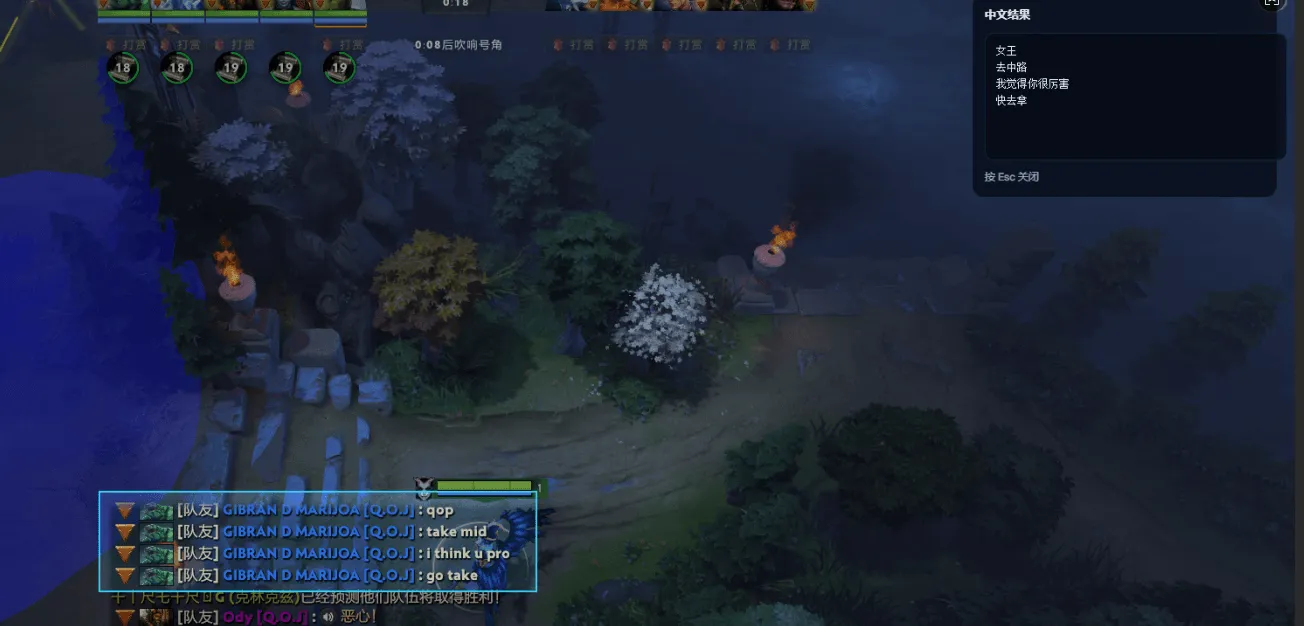
In-game screenshots
Open a screenshot to see how translated chat and input appear in the game.
Get started
Set up before the match and try a short message to learn the shortcuts.
Install the Windows client, create an account and sign in to receive your text and screenshot translation trial credits.
Choose English, Japanese, Korean, Russian or Spanish in the client settings and review the Alt + Q and Alt + E shortcuts.
Press Alt + E to select text you want to read. To reply, type Chinese in the game chat box, press Alt + Q and review the translation before sending.
Trial credits
200 credits
Write short Chinese messages about lanes, support and team fights.
100 credits
Recognize text in the chat area and read its Chinese translation.
These trial credits are included with registration. For additional credits and pricing, contact us.
FAQ
Languages, shortcuts, trial credits and what the tool can do.
DotaChat is a Windows translation tool for Chinese-speaking Dota 2 players on international servers. It translates chat text, screenshots and Chinese input to help players understand teammates and share their plans.
Choose English, Japanese, Korean, Russian or Spanish in the client settings. Screenshot translation recognizes text on screen and returns a Chinese translation.
Choose a target language in the client, type Chinese in the game chat box, then press Alt + Q. The client reads the input through the clipboard and pastes the translation back into the chat box. Check it before sending it yourself.
Press Alt + E and select the chat area. The client uploads the screenshot to a translation service for text recognition and translation, then displays the result in Chinese. Check the selected area to avoid including unrelated personal information.
Registration includes trial credits for 200 text translations and 100 screenshot translations. Contact us through WeChat or email to confirm how to obtain more credits and their cost.
This website provides a Windows installer. Translation requires an internet connection because text and screenshots are sent to a translation service. Offline translation is not supported.
Contact us through WeChat or email with the client version, steps to reproduce the issue, and the original text and translation. Hide account details and other personal information before sharing screenshots.
Press Alt + E and select the chat area you cannot read. The client recognizes the text and returns a Chinese translation. Frequent calls such as retreat, no mana or no ultimate are worth memorizing so you do not need a screenshot every time.
A browser translator requires leaving the game, copying text and pasting it back. DotaChat works inside a Windows client: Alt + E selects text on screen and Alt + Q pastes the translation back, so you stay in the match.
Useful Russian phrases, matchmaking language preferences and how translation tools work.
Learn 24 useful Russian phrases for Dota 2, with English meanings, pronunciation hints and examples for retreats, missing enemies, wards and team fights.
Read guideStill getting teammates who speak another language in Dota 2? Understand language preferences, check your queue settings and use practical communication options.
Read guideUnderstand DotaChat’s screenshot translation, clipboard shortcuts and online processing. Learn what these features do and what they cannot prove about VAC safety.
Read guideDownload DotaChat for Windows and start with one message.
Windows client · Version 1.0.2
Register and sign in to use translation. An internet connection is required.
Scan the WeChat QR code for help, translation feedback or questions about credits.
nbu074100319@126.comInclude your client version and the steps you took so we can investigate.